Technical
Track Federal Contract Pursuits from Discovery to Award — Introducing the Opportunity Pipeline
Finding federal contract opportunities is only half the battle. The other half is tracking them — knowing which pursuits are active, what stage each one is in, who the contacts are, and what needs to happen next.
Most small businesses track this in spreadsheets. Some use a CRM that wasn't built for government contracting. Either way, opportunities slip through the cracks.
Today we're launching the Opportunity Pipeline, a pursuit management board built specifically for federal contracting.
Finding federal contract opportunities is only half the battle. The other half is tracking them — knowing which pursuits are active, what stage each one is in, who the contacts are, and what needs to happen next.
Most small businesses track this in spreadsheets. Some use a CRM that wasn't built for government contracting. Either way, opportunities slip through the cracks.
Today we're launching the Opportunity Pipeline, a pursuit management board built specifically for federal contracting.
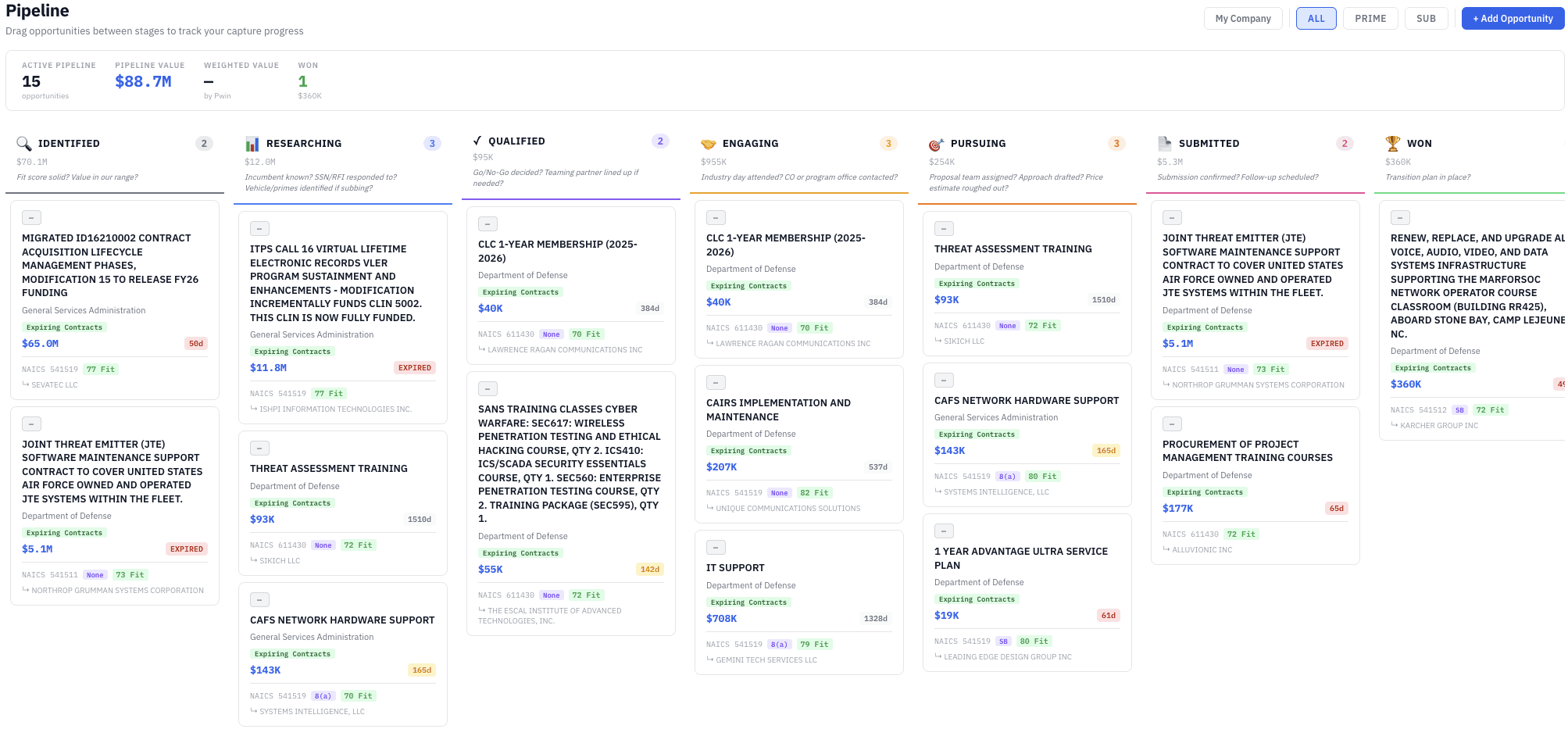

A Kanban Board for GovCon
The Pipeline organizes your pursuits into stages that match how federal capture actually works:
Identified → Researching → Qualified → Engaging → Pursuing → Submitted → Won → Lost
Drag opportunities between stages as they progress. Each card shows the agency, NAICS code, contract value, your Fit Score, and estimated win probability at a glance.
This isn't a generic project board. Every stage, every field, and every AI recommendation is designed around the federal procurement lifecycle.
One-Click Add from Everywhere
The fastest way to build your pipeline is to use the tools you're already using in FedProposal:
From the Expiring Contracts Dashboard — See a contract ending in 8 months that matches your profile? Click "Add to Pipeline" on the Expiring Contracts Dashboard and the agency, NAICS, incumbent, contract value, and your Fit Score are pre-filled automatically.
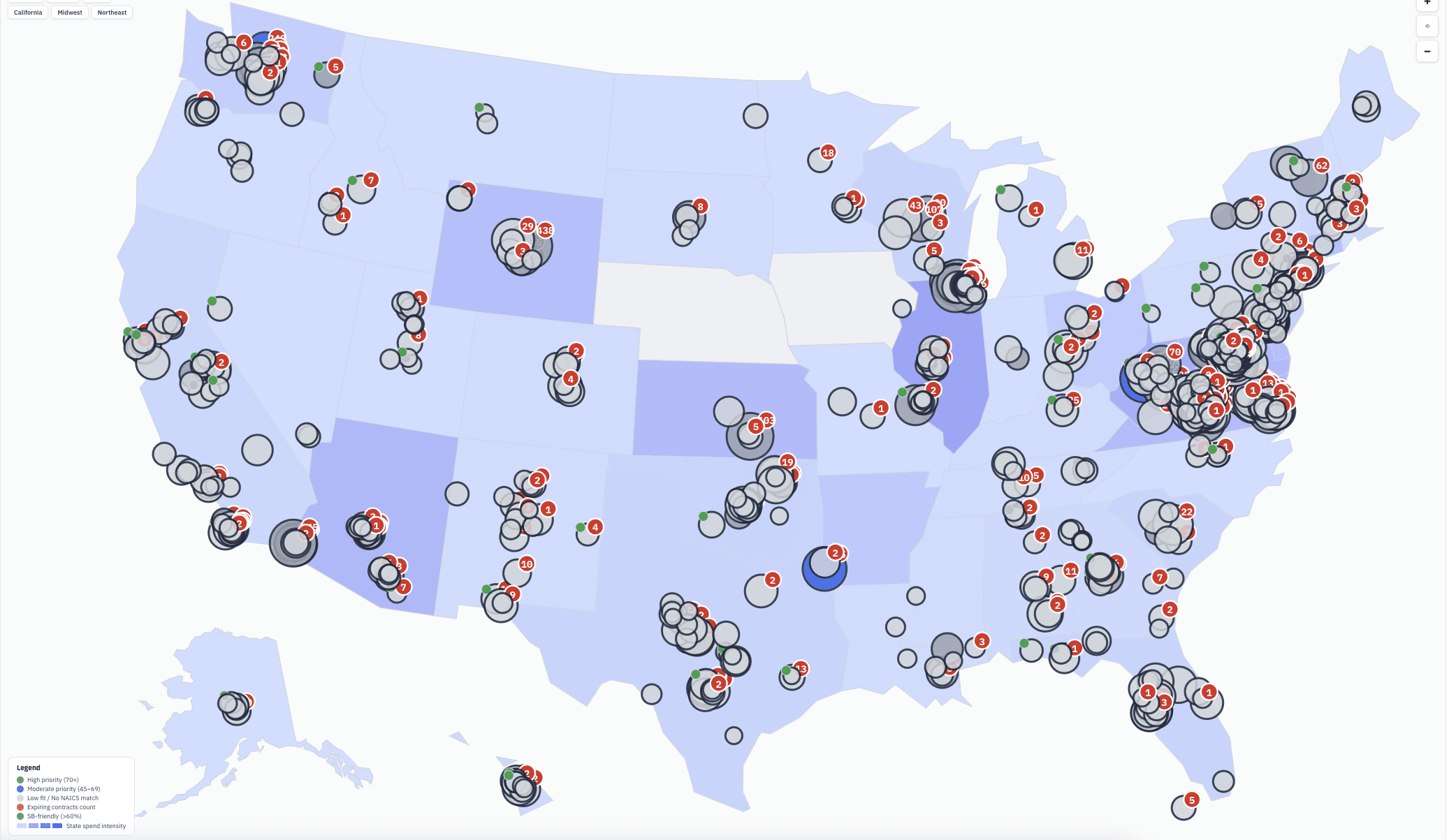
From the Intelligence Map — Found an office with high priority and expiring contracts in your NAICS codes on the Intelligence Map? Add them to your pipeline directly from the office detail panel.
From SAM Daily Email Alerts — Get a new opportunity in your nightly SAM Daily Email Alert that looks promising? Click "Add to Pipeline" right from the email — no need to log in to the dashboard first.
From SAM.gov Search on the Intelligence Map — Searching live SAM.gov opportunities at a specific contracting office on the Intelligence Map? Add any result to your pipeline with one click.
No re-typing. No copy-pasting solicitation numbers. The data flows from discovery to pursuit automatically.
Win Probability and Contacts
Every opportunity in your pipeline tracks:
Win Probability (Pwin) — Your estimated chance of winning, which you can update as you learn more about the competition and requirements.
Contracting Officer Contacts — Store the CO name, email, and phone. Add prime contractor contacts if you're pursuing as a subcontractor.
Role — Are you pursuing as prime or sub? The AI Capture Assistant tailors its advice based on your role.
Reminders — Set follow-up dates for industry days, Q&A deadlines, proposal due dates, or capability briefings.
Notes — Capture meeting notes, strategy decisions, and intelligence gathered during your pursuit.
AI Capture Assistant
Every opportunity in the pipeline has access to the AI Capture Assistant — a GovCon-aware AI that gives you stage-specific guidance based on the actual contract you're pursuing.
In the Researching stage, it might tell you: "This contract is on the OASIS+ vehicle. Here are the companies that hold OASIS+ and are active at this agency — consider teaming with one of them." Use the Research Tab to dig deeper into vehicle holders and competitor analysis.
In the Engaging stage: "This office has an industry day scheduled. Here's how to prepare a 5-minute capabilities brief that highlights your relevant past performance."
In the Pursuing stage: "Based on the set-aside type and your certifications, here are three win themes to consider for your technical approach."
The assistant knows your Fit Score, the incumbent's position, the contract vehicle, the competition level, and the set-aside type. It's like having a capture manager on call for every opportunity.
Works with Your Existing Workflow
The Pipeline doesn't replace what you're already doing in FedProposal — it connects everything together:
Your SAM Daily Alerts surface new opportunities every night
The Intelligence Map shows you which offices are the best fit
The Expiring Contracts Dashboard finds recompetes months before they hit the street
The Agency Fit Score tells you where to focus your BD efforts
Contract Lineage reveals the history of any contract you're considering
The Pipeline tracks your pursuit from discovery through award
Each tool feeds the next. That's the point — FedProposal isn't a collection of separate features. It's an integrated intelligence and pursuit platform.
Pipeline Metrics
At the top of the Pipeline page, you'll see your totals: number of active pursuits, total pipeline value, and a breakdown by stage. Use these metrics in your BD reviews and reporting.
Export your pipeline data for offline analysis, BD meetings, or CRM integration using our Excel export.
How to Get Started
Log in to your FedProposal dashboard
Click the Pipeline tab
Add your first opportunity — either manually or by clicking "Add to Pipeline" from the Expiring Contracts table, Intelligence Map, or a SAM alert email
Set your role (prime or sub), estimated win probability, and any contacts
Use the AI Capture Assistant for stage-specific pursuit guidance
Already have opportunities tracked in a spreadsheet? You can add them manually to the Pipeline in a few minutes and start getting AI capture advice immediately.
Try It Free
The Opportunity Pipeline is included for all subscribers at $149/month — or as low as $107.50/month on an annual plan.
Not a subscriber yet? Start your 7-day free trial — no credit card required. If FedProposal helps you find and pursue even one contract worth bidding, it pays for itself.
FedProposal is federal contract intelligence designed for small business. We automate the research that BD professionals spend hours doing manually — finding expiring contracts, analyzing incumbents, mapping contracting office intelligence, and managing your pursuit pipeline — so you can focus on winning work.
See all features → · View pricing → · Government contracting resources →
A Kanban Board for GovCon
The Pipeline organizes your pursuits into stages that match how federal capture actually works:
Identified → Researching → Qualified → Engaging → Pursuing → Submitted → Won → Lost
Drag opportunities between stages as they progress. Each card shows the agency, NAICS code, contract value, your Fit Score, and estimated win probability at a glance.
This isn't a generic project board. Every stage, every field, and every AI recommendation is designed around the federal procurement lifecycle.
One-Click Add from Everywhere
The fastest way to build your pipeline is to use the tools you're already using in FedProposal:
From the Expiring Contracts Dashboard — See a contract ending in 8 months that matches your profile? Click "Add to Pipeline" on the Expiring Contracts Dashboard and the agency, NAICS, incumbent, contract value, and your Fit Score are pre-filled automatically.
From the Intelligence Map — Found an office with high priority and expiring contracts in your NAICS codes on the Intelligence Map? Add them to your pipeline directly from the office detail panel.
From SAM Daily Email Alerts — Get a new opportunity in your nightly SAM Daily Email Alert that looks promising? Click "Add to Pipeline" right from the email — no need to log in to the dashboard first.
From SAM.gov Search on the Intelligence Map — Searching live SAM.gov opportunities at a specific contracting office on the Intelligence Map? Add any result to your pipeline with one click.
No re-typing. No copy-pasting solicitation numbers. The data flows from discovery to pursuit automatically.
Win Probability and Contacts
Every opportunity in your pipeline tracks:
Win Probability (Pwin) — Your estimated chance of winning, which you can update as you learn more about the competition and requirements.
Contracting Officer Contacts — Store the CO name, email, and phone. Add prime contractor contacts if you're pursuing as a subcontractor.
Role — Are you pursuing as prime or sub? The AI Capture Assistant tailors its advice based on your role.
Reminders — Set follow-up dates for industry days, Q&A deadlines, proposal due dates, or capability briefings.
Notes — Capture meeting notes, strategy decisions, and intelligence gathered during your pursuit.
AI Capture Assistant
Every opportunity in the pipeline has access to the AI Capture Assistant — a GovCon-aware AI that gives you stage-specific guidance based on the actual contract you're pursuing.
In the Researching stage, it might tell you: "This contract is on the OASIS+ vehicle. Here are the companies that hold OASIS+ and are active at this agency — consider teaming with one of them." Use the Research Tab to dig deeper into vehicle holders and competitor analysis.
In the Engaging stage: "This office has an industry day scheduled. Here's how to prepare a 5-minute capabilities brief that highlights your relevant past performance."
In the Pursuing stage: "Based on the set-aside type and your certifications, here are three win themes to consider for your technical approach."
The assistant knows your Fit Score, the incumbent's position, the contract vehicle, the competition level, and the set-aside type. It's like having a capture manager on call for every opportunity.
Works with Your Existing Workflow
The Pipeline doesn't replace what you're already doing in FedProposal — it connects everything together:
Your SAM Daily Alerts surface new opportunities every night
The Intelligence Map shows you which offices are the best fit
The Expiring Contracts Dashboard finds recompetes months before they hit the street
The Agency Fit Score tells you where to focus your BD efforts
Contract Lineage reveals the history of any contract you're considering
The Pipeline tracks your pursuit from discovery through award
Each tool feeds the next. That's the point — FedProposal isn't a collection of separate features. It's an integrated intelligence and pursuit platform.
Pipeline Metrics
At the top of the Pipeline page, you'll see your totals: number of active pursuits, total pipeline value, and a breakdown by stage. Use these metrics in your BD reviews and reporting.
Export your pipeline data for offline analysis, BD meetings, or CRM integration using our Excel export.
How to Get Started
Log in to your FedProposal dashboard
Click the Pipeline tab
Add your first opportunity — either manually or by clicking "Add to Pipeline" from the Expiring Contracts table, Intelligence Map, or a SAM alert email
Set your role (prime or sub), estimated win probability, and any contacts
Use the AI Capture Assistant for stage-specific pursuit guidance
Already have opportunities tracked in a spreadsheet? You can add them manually to the Pipeline in a few minutes and start getting AI capture advice immediately.
Try It Free
The Opportunity Pipeline is included for all subscribers at $149/month — or as low as $107.50/month on an annual plan.
Not a subscriber yet? Start your 7-day free trial — no credit card required. If FedProposal helps you find and pursue even one contract worth bidding, it pays for itself.
FedProposal is federal contract intelligence designed for small business. We automate the research that BD professionals spend hours doing manually — finding expiring contracts, analyzing incumbents, mapping contracting office intelligence, and managing your pursuit pipeline — so you can focus on winning work.
See all features → · View pricing → · Government contracting resources →