Technical
How to Use PSC Wildcards to Find Federal Contracts by Category
If you've ever searched for federal contracts by Product Service Code, you know the frustration. You want to find all R&D contracts, but there are dozens of codes: AC13, AC21, AD11, AR99, and on and on. Searching them one at a time isn't practical.
FedProposal now supports wildcard searches for PSC codes. Type A* and you'll find every R&D contract in one search.
If you've ever searched for federal contracts by Product Service Code, you know the frustration. You want to find all R&D contracts, but there are dozens of codes: AC13, AC21, AD11, AR99, and on and on. Searching them one at a time isn't practical.
FedProposal now supports wildcard searches for PSC codes. Type A* and you'll find every R&D contract in one search.
If you've ever searched for federal contracts by Product Service Code, you know the frustration. You want to find all R&D contracts, but there are dozens of codes: AC13, AC21, AD11, AR99, and on and on. Searching them one at a time isn't practical.
FedProposal now supports wildcard searches for PSC codes. Type A* and you'll find every R&D contract in one search.

How It Works
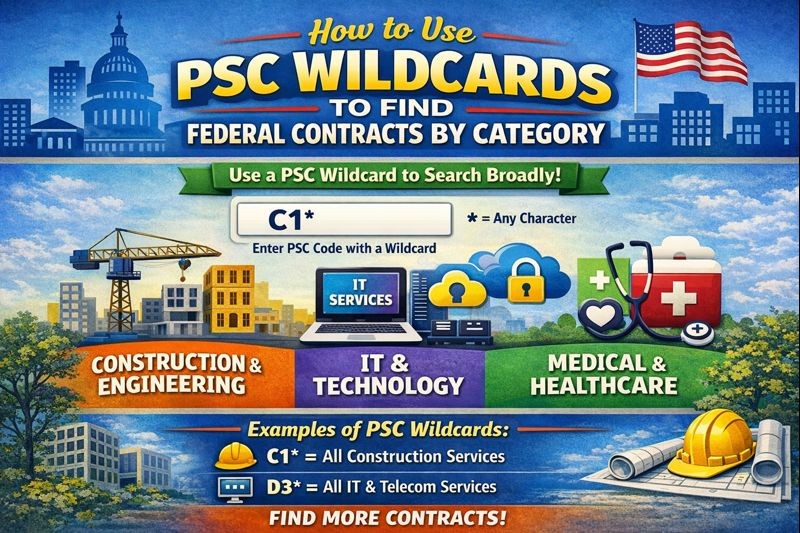
Add an asterisk (*) to the end of any PSC prefix. The search returns all contracts where the PSC code starts with that prefix.
Examples:
A*→ All R&D contracts (AC13, AD21, AR99, etc.)D*→ All IT and telecom services (D302, D306, D310, etc.)R4*→ Engineering and technical services (R408, R425, R499, etc.)
You can be as broad or specific as you want. D* casts a wide net across all IT services. D3* narrows to IT systems development and support. D30* gets even more specific.
Common Wildcards Worth Knowing
Wildcard | Category | What You'll Find |
|---|---|---|
| R&D | Research and development across all domains |
| IT/ADP | IT services, telecom, data processing |
| Professional Services | Engineering, consulting, program management |
| Maintenance | Equipment maintenance, repair, rebuilding |
| Studies & Analysis | Cost analysis, feasibility studies, research |
| Training | Education, curriculum development |
Why This Matters for Pipeline Building
Most contractors know their NAICS codes but struggle with PSC. The challenge is that PSC codes are granular—there are thousands of them. That granularity is powerful for precise research, but it makes broad category searches tedious.
Wildcards solve this. Instead of memorizing every R&D code or running dozens of separate searches, you search once and see the full picture.
This is especially useful when:
Exploring a new market — You're considering R&D contracts but don't know which specific codes apply to your work yet
Tracking agency spending patterns — You want to see everything an agency buys in IT services, not just one narrow slice
Building a comprehensive pipeline — You don't want to miss contracts because they used an unexpected PSC code
Wildcards + Your PSC Experience = Better Fit Scores
FedProposal has two PSC fields, and they work differently:
Top filter (What you want to see): Use wildcards here to search broad categories. Enter A* to see all R&D contracts in the table.
Bottom field in Your Fit Score (What you do): Enter your specific PSC codes here—the ones you actually have experience in. This improves your Fit Score accuracy by matching your experience to each contract.
The combination is powerful. Filter to A* to see all R&D opportunities, then let your specific PSC experience (AC13, AC21) drive the scoring. Contracts matching your exact codes score higher, while you still see the full R&D landscape.
For R&D Contractors: A Tax Credit Angle
If you're pursuing federal R&D contracts, you may also qualify for the R&D tax credit. The credit applies to qualified research expenses—and work performed under R&D contracts often qualifies.
Using A* to find and track R&D contracts isn't just good business development. It's also useful documentation if you're claiming the credit. You can clearly show your R&D contract pipeline and awards.
Try It Now
In FedProposal's expiring contracts search:
Enter your NAICS code
In the PSC field, enter a wildcard like
A*,D*, orR4*Click Search
You'll see every expiring contract in that category, ranked by your Fit Score.
No more hunting through dozens of individual codes. No more missing contracts because you forgot one PSC variant. Just one search that shows you the full picture.
Want to understand the difference between NAICS and PSC codes in depth? Read Why PSC Codes Matter More Than NAICS When Researching Federal Contracts.
How It Works
Add an asterisk (*) to the end of any PSC prefix. The search returns all contracts where the PSC code starts with that prefix.
Examples:
A*→ All R&D contracts (AC13, AD21, AR99, etc.)D*→ All IT and telecom services (D302, D306, D310, etc.)R4*→ Engineering and technical services (R408, R425, R499, etc.)
You can be as broad or specific as you want. D* casts a wide net across all IT services. D3* narrows to IT systems development and support. D30* gets even more specific.
Common Wildcards Worth Knowing
Wildcard | Category | What You'll Find |
|---|---|---|
| R&D | Research and development across all domains |
| IT/ADP | IT services, telecom, data processing |
| Professional Services | Engineering, consulting, program management |
| Maintenance | Equipment maintenance, repair, rebuilding |
| Studies & Analysis | Cost analysis, feasibility studies, research |
| Training | Education, curriculum development |
Why This Matters for Pipeline Building
Most contractors know their NAICS codes but struggle with PSC. The challenge is that PSC codes are granular—there are thousands of them. That granularity is powerful for precise research, but it makes broad category searches tedious.
Wildcards solve this. Instead of memorizing every R&D code or running dozens of separate searches, you search once and see the full picture.
This is especially useful when:
Exploring a new market — You're considering R&D contracts but don't know which specific codes apply to your work yet
Tracking agency spending patterns — You want to see everything an agency buys in IT services, not just one narrow slice
Building a comprehensive pipeline — You don't want to miss contracts because they used an unexpected PSC code
Wildcards + Your PSC Experience = Better Fit Scores
FedProposal has two PSC fields, and they work differently:
Top filter (What you want to see): Use wildcards here to search broad categories. Enter A* to see all R&D contracts in the table.
Bottom field in Your Fit Score (What you do): Enter your specific PSC codes here—the ones you actually have experience in. This improves your Fit Score accuracy by matching your experience to each contract.
The combination is powerful. Filter to A* to see all R&D opportunities, then let your specific PSC experience (AC13, AC21) drive the scoring. Contracts matching your exact codes score higher, while you still see the full R&D landscape.
For R&D Contractors: A Tax Credit Angle
If you're pursuing federal R&D contracts, you may also qualify for the R&D tax credit. The credit applies to qualified research expenses—and work performed under R&D contracts often qualifies.
Using A* to find and track R&D contracts isn't just good business development. It's also useful documentation if you're claiming the credit. You can clearly show your R&D contract pipeline and awards.
Try It Now
In FedProposal's expiring contracts search:
Enter your NAICS code
In the PSC field, enter a wildcard like
A*,D*, orR4*Click Search
You'll see every expiring contract in that category, ranked by your Fit Score.
No more hunting through dozens of individual codes. No more missing contracts because you forgot one PSC variant. Just one search that shows you the full picture.
Want to understand the difference between NAICS and PSC codes in depth? Read Why PSC Codes Matter More Than NAICS When Researching Federal Contracts.